Blinding glow
Blinding glow
Hello, my problem is not really a problem but something I find very annoying. Whenever I pull out a weapon that glows (earthfire sword) or say a fireball, the glow of the item/spell is so bright I can't see anything else. I remember getting this when I changed Graphic card a while back. Anyway to dimnish the glow? ( with fireballs it's so bad that my game starts lagging)
-
Blín D'ñero

- Site Admin
- Posts: 11037
- Joined: 17 Feb 2008, 02:05
- Location: Netherlands
- Contact:
Re: Blinding glow
What monitor do you have lelorien? Have you checked it isn't set too bright? In the game, you can alter the Gamma setting: Options > Video > "Adjust brightness levels...". I suppose that will fix it for you.
Gaming PC: Asus TUF Gaming 570-Pro (wi-fi) * AMD Ryzen 7 5800X * Noctua NH-D15 * Corsair Vengeance LPX 64GB * Asus TUF RX 9070XT * Creative AE-9PE * 2 x Samsung 990 Pro * 7 x WD Gold HDD * Corsair RM 1000X * 1 x Asus DRW-24D5MT * Dell U3010 * Windows 11 *
Office PC: Asus TUF Gaming 570-Pro (wi-fi) * AMD Ryzen 7 5800X * Noctua NH-D15 * Corsair Vengeance LPX 64GB * Asus TUF Radeon 6800XT * Creative Soundblaster ZxR * 2 x Samsung 980 Pro * 7 x WD Gold HDD * Corsair HX 1000i * 1 x Asus DRW-24D5MT * Dell U4323QE * Club 3D DisplayPort2.1 BI-D 4K240Hz 1.6m * Windows 11 *
Office PC: Asus TUF Gaming 570-Pro (wi-fi) * AMD Ryzen 7 5800X * Noctua NH-D15 * Corsair Vengeance LPX 64GB * Asus TUF Radeon 6800XT * Creative Soundblaster ZxR * 2 x Samsung 980 Pro * 7 x WD Gold HDD * Corsair HX 1000i * 1 x Asus DRW-24D5MT * Dell U4323QE * Club 3D DisplayPort2.1 BI-D 4K240Hz 1.6m * Windows 11 *
Re: Blinding glow
I lowered everything to the darkest but the glow is still blinding.
- cropped and attached by BlindNero
-
Blín D'ñero
- Site Admin
- Posts: 11037
- Joined: 17 Feb 2008, 02:05
- Location: Netherlands
- Contact:
Re: Blinding glow
Lelorien please try to crop the image as to only show the picture itself, without the enormous white field. Can you do that? [EDIT i just did it for you]
But if you move the camera down, what happens? HDR effect should smoothen and detail.
I have this (moved down with the camera).
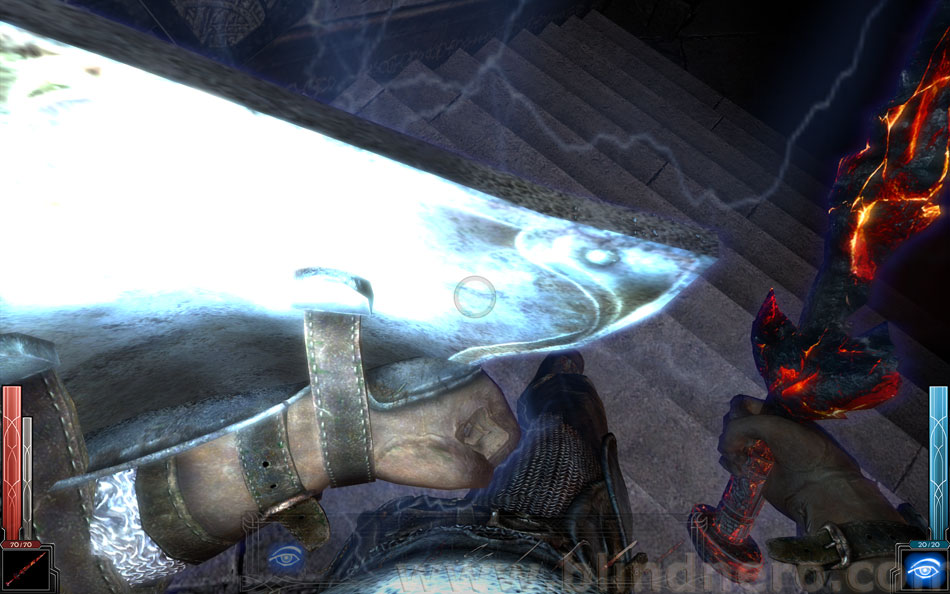
(screenshot from my HD5870 CF system, but also tested the same spot on my HD4870X2 system and it looks exactly the same)
IIRC you have an HD4800 card (4850?). Make sure you max out all the settings in the game's Options > Video > Advanced (open every dropdownbox and select the bottom option = highest).
In Catalyst Control Center (CCC) > 3D > ALL > make sure you have:
Smoothvision HD AA: use application settings
Smoothvision HD AF: use application settings
Catalyst AI: standard
Mipmap detail: quality
Wait for v-sync: doesn't matter
Adaptive AA: off
If that doesn't change anything, under HDR you could try 'Bloom'.
But if you move the camera down, what happens? HDR effect should smoothen and detail.
I have this (moved down with the camera).
(screenshot from my HD5870 CF system, but also tested the same spot on my HD4870X2 system and it looks exactly the same)
IIRC you have an HD4800 card (4850?). Make sure you max out all the settings in the game's Options > Video > Advanced (open every dropdownbox and select the bottom option = highest).
In Catalyst Control Center (CCC) > 3D > ALL > make sure you have:
Smoothvision HD AA: use application settings
Smoothvision HD AF: use application settings
Catalyst AI: standard
Mipmap detail: quality
Wait for v-sync: doesn't matter
Adaptive AA: off
If that doesn't change anything, under HDR you could try 'Bloom'.
Gaming PC: Asus TUF Gaming 570-Pro (wi-fi) * AMD Ryzen 7 5800X * Noctua NH-D15 * Corsair Vengeance LPX 64GB * Asus TUF RX 9070XT * Creative AE-9PE * 2 x Samsung 990 Pro * 7 x WD Gold HDD * Corsair RM 1000X * 1 x Asus DRW-24D5MT * Dell U3010 * Windows 11 *
Office PC: Asus TUF Gaming 570-Pro (wi-fi) * AMD Ryzen 7 5800X * Noctua NH-D15 * Corsair Vengeance LPX 64GB * Asus TUF Radeon 6800XT * Creative Soundblaster ZxR * 2 x Samsung 980 Pro * 7 x WD Gold HDD * Corsair HX 1000i * 1 x Asus DRW-24D5MT * Dell U4323QE * Club 3D DisplayPort2.1 BI-D 4K240Hz 1.6m * Windows 11 *
Office PC: Asus TUF Gaming 570-Pro (wi-fi) * AMD Ryzen 7 5800X * Noctua NH-D15 * Corsair Vengeance LPX 64GB * Asus TUF Radeon 6800XT * Creative Soundblaster ZxR * 2 x Samsung 980 Pro * 7 x WD Gold HDD * Corsair HX 1000i * 1 x Asus DRW-24D5MT * Dell U4323QE * Club 3D DisplayPort2.1 BI-D 4K240Hz 1.6m * Windows 11 *
Re: Blinding glow
Shutting HDR worked for me, thanks!
-
Blín D'ñero
- Site Admin
- Posts: 11037
- Joined: 17 Feb 2008, 02:05
- Location: Netherlands
- Contact:
Re: Blinding glow
You disabled HDR entirely in the game's options? That's a bit drastic. But if to you that looks best...
Gaming PC: Asus TUF Gaming 570-Pro (wi-fi) * AMD Ryzen 7 5800X * Noctua NH-D15 * Corsair Vengeance LPX 64GB * Asus TUF RX 9070XT * Creative AE-9PE * 2 x Samsung 990 Pro * 7 x WD Gold HDD * Corsair RM 1000X * 1 x Asus DRW-24D5MT * Dell U3010 * Windows 11 *
Office PC: Asus TUF Gaming 570-Pro (wi-fi) * AMD Ryzen 7 5800X * Noctua NH-D15 * Corsair Vengeance LPX 64GB * Asus TUF Radeon 6800XT * Creative Soundblaster ZxR * 2 x Samsung 980 Pro * 7 x WD Gold HDD * Corsair HX 1000i * 1 x Asus DRW-24D5MT * Dell U4323QE * Club 3D DisplayPort2.1 BI-D 4K240Hz 1.6m * Windows 11 *
Office PC: Asus TUF Gaming 570-Pro (wi-fi) * AMD Ryzen 7 5800X * Noctua NH-D15 * Corsair Vengeance LPX 64GB * Asus TUF Radeon 6800XT * Creative Soundblaster ZxR * 2 x Samsung 980 Pro * 7 x WD Gold HDD * Corsair HX 1000i * 1 x Asus DRW-24D5MT * Dell U4323QE * Club 3D DisplayPort2.1 BI-D 4K240Hz 1.6m * Windows 11 *