Yeah i know it is not funny how sometimes problems seem to persist but i wouldn't solve any problem if i didn't go over every step again with a magnifying glass, starting all over. I can't replicate the issue on any of my machines, but i do have the testimony of item =3= in the troubleshooting thread from other players that it turned out to be a Steam issue which they solved as described.
But your problem still could have another cause.
When you said "fresh format" that was not a quick format but a full format, right?
In your dxdiag i notice all your hddrives as SCSI Disk Device, why? WDC WD75 01AALS-00J7B is a Black Edition SATA; in dxdiag they should show up as 'ATA Device'. The drives should be connected to the SATA controllers. And there's a setting you can change in BIOS but in any case before OS installation. Unless setting up a RAID array, you're supposed to have them set to IDE mode. Which i think by default it is.
Major FPS drops in single player.
-
Blín D'ñero

- Site Admin
- Posts: 11037
- Joined: 17 Feb 2008, 02:05
- Location: Netherlands
- Contact:
Re: Major FPS drops in single player.
Gaming PC: Asus TUF Gaming 570-Pro (wi-fi) * AMD Ryzen 7 5800X * Noctua NH-D15 * Corsair Vengeance LPX 64GB * Asus TUF RX 9070XT * Creative AE-9PE * 2 x Samsung 990 Pro * 7 x WD Gold HDD * Corsair RM 1000X * 1 x Asus DRW-24D5MT * Dell U3010 * Windows 11 *
Office PC: Asus TUF Gaming 570-Pro (wi-fi) * AMD Ryzen 7 5800X * Noctua NH-D15 * Corsair Vengeance LPX 64GB * Asus TUF Radeon 6800XT * Creative Soundblaster ZxR * 2 x Samsung 980 Pro * 7 x WD Gold HDD * Corsair HX 1000i * 1 x Asus DRW-24D5MT * Dell U4323QE * Club 3D DisplayPort2.1 BI-D 4K240Hz 1.6m * Windows 11 *
Office PC: Asus TUF Gaming 570-Pro (wi-fi) * AMD Ryzen 7 5800X * Noctua NH-D15 * Corsair Vengeance LPX 64GB * Asus TUF Radeon 6800XT * Creative Soundblaster ZxR * 2 x Samsung 980 Pro * 7 x WD Gold HDD * Corsair HX 1000i * 1 x Asus DRW-24D5MT * Dell U4323QE * Club 3D DisplayPort2.1 BI-D 4K240Hz 1.6m * Windows 11 *
-
Delfofthebla
- Posts: 15
- Joined: 16 Aug 2010, 12:16
Re: Major FPS drops in single player.
Yes, I used a full format and not quick format. I wasn't aware you could even do a quick format for win7.
As for the hard drives, that's super weird. I didn't change them via the bios, and they are connected via sata cables. (With the exception of the external.) What's the difference?
As for the hard drives, that's super weird. I didn't change them via the bios, and they are connected via sata cables. (With the exception of the external.) What's the difference?
-
Blín D'ñero
- Site Admin
- Posts: 11037
- Joined: 17 Feb 2008, 02:05
- Location: Netherlands
- Contact:
Re: Major FPS drops in single player.
It's probably the nVidia chipset doing that. It's weird but don't worry about it, shouldn't be a problem.
Which Bios version do you have? So you don't have
Also, try changing your default audio device which is C-Media USB, to High Definition Audio Device which is onboard.
Which Bios version do you have? So you don't have
but which do you have?P10
BIOS Date : 01/20/2010
Also, try changing your default audio device which is C-Media USB, to High Definition Audio Device which is onboard.
Gaming PC: Asus TUF Gaming 570-Pro (wi-fi) * AMD Ryzen 7 5800X * Noctua NH-D15 * Corsair Vengeance LPX 64GB * Asus TUF RX 9070XT * Creative AE-9PE * 2 x Samsung 990 Pro * 7 x WD Gold HDD * Corsair RM 1000X * 1 x Asus DRW-24D5MT * Dell U3010 * Windows 11 *
Office PC: Asus TUF Gaming 570-Pro (wi-fi) * AMD Ryzen 7 5800X * Noctua NH-D15 * Corsair Vengeance LPX 64GB * Asus TUF Radeon 6800XT * Creative Soundblaster ZxR * 2 x Samsung 980 Pro * 7 x WD Gold HDD * Corsair HX 1000i * 1 x Asus DRW-24D5MT * Dell U4323QE * Club 3D DisplayPort2.1 BI-D 4K240Hz 1.6m * Windows 11 *
Office PC: Asus TUF Gaming 570-Pro (wi-fi) * AMD Ryzen 7 5800X * Noctua NH-D15 * Corsair Vengeance LPX 64GB * Asus TUF Radeon 6800XT * Creative Soundblaster ZxR * 2 x Samsung 980 Pro * 7 x WD Gold HDD * Corsair HX 1000i * 1 x Asus DRW-24D5MT * Dell U4323QE * Club 3D DisplayPort2.1 BI-D 4K240Hz 1.6m * Windows 11 *
-
Delfofthebla
- Posts: 15
- Joined: 16 Aug 2010, 12:16
Re: Major FPS drops in single player.
1/16/08
Sony - 42302e31
Phoenix - AwardBIOS v6.00PG
(Just grabbed this from the SystemBiosDate/Version from the registry, not sure if you needed the last part.)
I'll try running it from the onboard sound later today.
Sony - 42302e31
Phoenix - AwardBIOS v6.00PG
(Just grabbed this from the SystemBiosDate/Version from the registry, not sure if you needed the last part.)
I'll try running it from the onboard sound later today.
-
Blín D'ñero
- Site Admin
- Posts: 11037
- Joined: 17 Feb 2008, 02:05
- Location: Netherlands
- Contact:
Re: Major FPS drops in single player.
No that's not your motherboard's bios version. You cannot grab it from Windows registry. (what you have there is the version number of the bios software manufacterer, not the cmos contents which is the actual bios data)
The BIOS version is displayed at the top of the first page of POST (power on self test). The first white on black letters you see when starting the PC. It should probably look like a "P08", "P07", or similar.
Other suggestions to try:
Then go into BIOS and try disabling Legacy USB support, maybe that helps.
Also try running only 2 RAM modules instead of 4, be sure to follow manual's direction, probably slots 1 + 3. Maybe that helps.
On the other hand, even if it works, running a 64-bit OS with only 2 GB RAM isn't such a good idea.
I'm guessing the memory controller on the board and Windows 7 don't go well together. You had no problems on XP. It's an old board, i would put XP back, and assemble a new PC for Windows 7 x64.
The BIOS version is displayed at the top of the first page of POST (power on self test). The first white on black letters you see when starting the PC. It should probably look like a "P08", "P07", or similar.
Other suggestions to try:
Then go into BIOS and try disabling Legacy USB support, maybe that helps.
Also try running only 2 RAM modules instead of 4, be sure to follow manual's direction, probably slots 1 + 3. Maybe that helps.
On the other hand, even if it works, running a 64-bit OS with only 2 GB RAM isn't such a good idea.
I'm guessing the memory controller on the board and Windows 7 don't go well together. You had no problems on XP. It's an old board, i would put XP back, and assemble a new PC for Windows 7 x64.
Gaming PC: Asus TUF Gaming 570-Pro (wi-fi) * AMD Ryzen 7 5800X * Noctua NH-D15 * Corsair Vengeance LPX 64GB * Asus TUF RX 9070XT * Creative AE-9PE * 2 x Samsung 990 Pro * 7 x WD Gold HDD * Corsair RM 1000X * 1 x Asus DRW-24D5MT * Dell U3010 * Windows 11 *
Office PC: Asus TUF Gaming 570-Pro (wi-fi) * AMD Ryzen 7 5800X * Noctua NH-D15 * Corsair Vengeance LPX 64GB * Asus TUF Radeon 6800XT * Creative Soundblaster ZxR * 2 x Samsung 980 Pro * 7 x WD Gold HDD * Corsair HX 1000i * 1 x Asus DRW-24D5MT * Dell U4323QE * Club 3D DisplayPort2.1 BI-D 4K240Hz 1.6m * Windows 11 *
Office PC: Asus TUF Gaming 570-Pro (wi-fi) * AMD Ryzen 7 5800X * Noctua NH-D15 * Corsair Vengeance LPX 64GB * Asus TUF Radeon 6800XT * Creative Soundblaster ZxR * 2 x Samsung 980 Pro * 7 x WD Gold HDD * Corsair HX 1000i * 1 x Asus DRW-24D5MT * Dell U4323QE * Club 3D DisplayPort2.1 BI-D 4K240Hz 1.6m * Windows 11 *
-
Delfofthebla
- Posts: 15
- Joined: 16 Aug 2010, 12:16
Re: Major FPS drops in single player.
Sorry for not replying back sooner. Had finals that upcoming week so I was kinda busy. After wards I simply stopped caring and decided to just give up. Dark Messiah was an amazing game, but was unfortunately coded like crap. I appreciate all the help BlindNero, but I honestly don't think it's worth the time to try and fix it anymore.
-
Blín D'ñero
- Site Admin
- Posts: 11037
- Joined: 17 Feb 2008, 02:05
- Location: Netherlands
- Contact:
Re: Major FPS drops in single player.
Are you a programmer? Have you read the game's entire code and determined that it's caused your problem? I don't think so.Delfofthebla wrote:Dark Messiah was an amazing game, but was unfortunately coded like crap.
And why doesn't everybody have the same issue?
The game running in slowmo on your machine is a clear indication that something's not right on your system, but you give up trying to solve it before you even started; to you it's even too complicated to find the actual bios version (it's in post screen, not in Windows Registry...). I hope for you no other game will be triggering the same issue.
Gaming PC: Asus TUF Gaming 570-Pro (wi-fi) * AMD Ryzen 7 5800X * Noctua NH-D15 * Corsair Vengeance LPX 64GB * Asus TUF RX 9070XT * Creative AE-9PE * 2 x Samsung 990 Pro * 7 x WD Gold HDD * Corsair RM 1000X * 1 x Asus DRW-24D5MT * Dell U3010 * Windows 11 *
Office PC: Asus TUF Gaming 570-Pro (wi-fi) * AMD Ryzen 7 5800X * Noctua NH-D15 * Corsair Vengeance LPX 64GB * Asus TUF Radeon 6800XT * Creative Soundblaster ZxR * 2 x Samsung 980 Pro * 7 x WD Gold HDD * Corsair HX 1000i * 1 x Asus DRW-24D5MT * Dell U4323QE * Club 3D DisplayPort2.1 BI-D 4K240Hz 1.6m * Windows 11 *
Office PC: Asus TUF Gaming 570-Pro (wi-fi) * AMD Ryzen 7 5800X * Noctua NH-D15 * Corsair Vengeance LPX 64GB * Asus TUF Radeon 6800XT * Creative Soundblaster ZxR * 2 x Samsung 980 Pro * 7 x WD Gold HDD * Corsair HX 1000i * 1 x Asus DRW-24D5MT * Dell U4323QE * Club 3D DisplayPort2.1 BI-D 4K240Hz 1.6m * Windows 11 *
-
rditto48801

- Posts: 521
- Joined: 17 Feb 2008, 03:34
- Location: In an ACU, riding an Appleseed style Spider Fortress, on a Mammoth class Dropship.
Re: Major FPS drops in single player.
This topic caught my eye, as did something else when I glanced at the dxdiag.
Blín D'ñero, double check the dxdiag.
Under Display Devices.
This part
Could the video card, or something relating to it such as on board MB video, be sucking up a huge chunk of system memory for use as video memory, leaving much less for the OS and applications?
If memory is the problem, the problem may have existed before, but not been noticed since 32 bit XP uses far less RAM than 64 bit Windows 7 does.
Blín D'ñero, double check the dxdiag.
Under Display Devices.
This part
Is that Shared Memory bit a possible cause, or a sign of a possible problem?Display Memory: 2668 MB
Dedicated Memory: 877 MB
Shared Memory: 1791 MB <-- mainly this part
Current Mode: 1920 x 1080 (32 bit) (59Hz)
Could the video card, or something relating to it such as on board MB video, be sucking up a huge chunk of system memory for use as video memory, leaving much less for the OS and applications?
If memory is the problem, the problem may have existed before, but not been noticed since 32 bit XP uses far less RAM than 64 bit Windows 7 does.
Boldly going forward, 'cause I can't find reverse.
Doctor Watson; Proving that being wrong is one step closer to being right.
Doctor Watson; Proving that being wrong is one step closer to being right.
-
Blín D'ñero
- Site Admin
- Posts: 11037
- Joined: 17 Feb 2008, 02:05
- Location: Netherlands
- Contact:
Re: Major FPS drops in single player.

You may have a point there: Windows 7 x64 performs best with 8 GB system RAM. He has only 4GB, minus the shared memory. So the game might start useing the Paging File on the hdd which is slow.
The shared memory is what Windows does, it allocates system RAM for video.
His 'dedicated memory' is what's on the card itself, the VRAM.
But this is strange, he has:
2668 MB 'display memory' with a single card.from dxdiag Delfofthebla wrote:---------------
Display Devices
---------------
Card name: NVIDIA GeForce GTX 260
Manufacturer: NVIDIA
Chip type: GeForce GTX 260
DAC type: Integrated RAMDAC
Device Key: Enum\PCI\VEN_10DE&DEV_05E2&SUBSYS_12553842&REV_A1
Display Memory: 2668 MB
Dedicated Memory: 877 MB
Shared Memory: 1791 MB
Current Mode: 1920 x 1080 (32 bit) (59Hz)
Monitor Name: Generic PnP Monitor
Monitor Model: ASUS VH242H
Monitor Id: ACI24F3
Native Mode: 1920 x 1080(p) (60.000Hz)
Output Type: DVI
while i apparently have only 716 MB of it, with TWO cards...

from dxdiag BlindNero wrote:---------------
Display Devices
---------------
Card name: ATI Radeon HD 5800 Series
Manufacturer: ATI Technologies Inc.
Chip type: ATI display adapter (0x6898)
DAC type: Internal DAC(400MHz)
Device Key: Enum\PCI\VEN_1002&DEV_6898&SUBSYS_0B001002&REV_00
Display Memory: 716 MB
Dedicated Memory: 2009 MB
Shared Memory: 2803 MB
Current Mode: 1920 x 1200 (32 bit) (60Hz)
Monitor Name: Dell U2410(Digital)
Monitor Model: DELL U2410
Monitor Id: DELF015
Native Mode: 1920 x 1200(p) (59.950Hz)
Output Type: DVI
Gaming PC: Asus TUF Gaming 570-Pro (wi-fi) * AMD Ryzen 7 5800X * Noctua NH-D15 * Corsair Vengeance LPX 64GB * Asus TUF RX 9070XT * Creative AE-9PE * 2 x Samsung 990 Pro * 7 x WD Gold HDD * Corsair RM 1000X * 1 x Asus DRW-24D5MT * Dell U3010 * Windows 11 *
Office PC: Asus TUF Gaming 570-Pro (wi-fi) * AMD Ryzen 7 5800X * Noctua NH-D15 * Corsair Vengeance LPX 64GB * Asus TUF Radeon 6800XT * Creative Soundblaster ZxR * 2 x Samsung 980 Pro * 7 x WD Gold HDD * Corsair HX 1000i * 1 x Asus DRW-24D5MT * Dell U4323QE * Club 3D DisplayPort2.1 BI-D 4K240Hz 1.6m * Windows 11 *
Office PC: Asus TUF Gaming 570-Pro (wi-fi) * AMD Ryzen 7 5800X * Noctua NH-D15 * Corsair Vengeance LPX 64GB * Asus TUF Radeon 6800XT * Creative Soundblaster ZxR * 2 x Samsung 980 Pro * 7 x WD Gold HDD * Corsair HX 1000i * 1 x Asus DRW-24D5MT * Dell U4323QE * Club 3D DisplayPort2.1 BI-D 4K240Hz 1.6m * Windows 11 *
-
rditto48801
- Posts: 521
- Joined: 17 Feb 2008, 03:34
- Location: In an ACU, riding an Appleseed style Spider Fortress, on a Mammoth class Dropship.
Re: Major FPS drops in single player.
Random thought after doing some google searching.
on Yahoo Answers, someone also having similar performance problems.
The only answer asked if the drivers installed the proper ones to use for Windows 7 64bit.
I ran across this thread on this site about memory usage
One thing that caught my eye that might be related.
Reports of slowdown on Windows 7, a few things suggested (some probably already done)
https://boi-forum.perfectworld.com/show ... p?p=790471
Another mention of lag, this time related to Windows 7 using shaders on anything other than low, even minor lag with shaders on low, and with having XP with no real lag even on max settings.
https://sc2pod.com/trackers/blue/battle-net/?id=5099
One thing I recall, Silent Hunter 5.
Use of shaders in that game would sometimes cause major lag iirc.
BlindNero.
I seem to have noticed that, more often than not, dxdiag I have run across seem to have Display Memory = Dedicated Memory + Shared Memory.
While poking around with google due to nothing else to do, I ran across stuff on that subject.
https://www.gamespot.com/pages/forums/s ... 144&page=0
I found a link for it on cnet. Seems simple and handy, it shows assorted info, and it shows stuff like GPU core and memory clock, temp, fan speed, etc.
https://download.cnet.com/GPU-Z/3000-20 ... 88513.html
on Yahoo Answers, someone also having similar performance problems.
The only answer asked if the drivers installed the proper ones to use for Windows 7 64bit.
I ran across this thread on this site about memory usage
One thing that caught my eye that might be related.
Also noticed this.Have found the problem. It's a bios setting for the motherboard that reduces the ram
for 32bit or opens the full ram available for x64. The labeling for it is actually backwards just looking at the bios entry. have the proper setting and now I have the full 4GB available.
I am unsure if that is the same type of problem or not, but it seem related (I could be wrong)The answer is with Nvidia, however, they are awfully tight lip. Something about Nvidia drivers or cards that make them reserve a portion of RAM. Don't know why...
Reports of slowdown on Windows 7, a few things suggested (some probably already done)
https://boi-forum.perfectworld.com/show ... p?p=790471
I removed 2, since it relates to the game the post was for.1. [1] Try visting your system manifacturer for recent graphics card updates.
[3] Run Windows up date to make sure that your divers are up to date.
[4] You can also try uninstalling the game and reinstalling it to have everything as default.
[5] Please also try running the game as admin since you are on windows 7.
Another mention of lag, this time related to Windows 7 using shaders on anything other than low, even minor lag with shaders on low, and with having XP with no real lag even on max settings.
https://sc2pod.com/trackers/blue/battle-net/?id=5099
One thing I recall, Silent Hunter 5.
Use of shaders in that game would sometimes cause major lag iirc.
BlindNero.
I seem to have noticed that, more often than not, dxdiag I have run across seem to have Display Memory = Dedicated Memory + Shared Memory.
While poking around with google due to nothing else to do, I ran across stuff on that subject.
https://www.gamespot.com/pages/forums/s ... 144&page=0
I looked up GPU-Z, mentioned in the thread as a reliable alternative for getting video card info.That seems to bean error. The display memory should be the dedicated + shared memory. It might be reported incorrectly because it exceeds 4 GB.
I found a link for it on cnet. Seems simple and handy, it shows assorted info, and it shows stuff like GPU core and memory clock, temp, fan speed, etc.
https://download.cnet.com/GPU-Z/3000-20 ... 88513.html
-
Blín D'ñero
- Site Admin
- Posts: 11037
- Joined: 17 Feb 2008, 02:05
- Location: Netherlands
- Contact:
Re: Major FPS drops in single player.
GPU-Z can be a useful tool but sometimes incorrect as for instance it doesn't understand Catalyst driver's ULPS feature in HD5xxx crossfire setups.
The 'bios setting' is the "memory remap" feature but since his dxdiag shows 4 GB i supposed he has that enabled. But maybe he hasn't.
Or possibly PAE in Windows but i don't think he has been tinkering with that or would have mentioned it. And 64-bit versions of Windows do not support PAE.
That 'display memory' weirdness a dxdiag error?
Anyway, in Properties i have this:
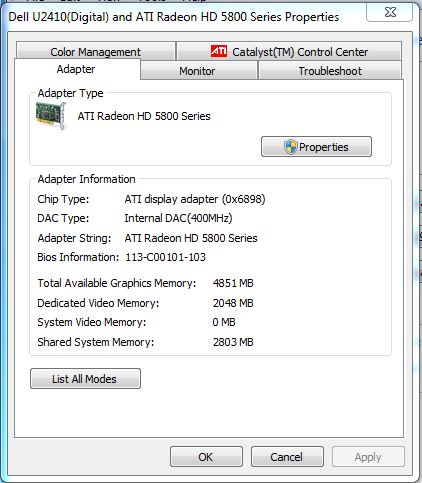
Windows Updates, it crossed my mind seeing his
But he said he tried all the options in the troubleshooting guide, and he gives up. So why keep on speculating...
The 'bios setting' is the "memory remap" feature but since his dxdiag shows 4 GB i supposed he has that enabled. But maybe he hasn't.
Or possibly PAE in Windows but i don't think he has been tinkering with that or would have mentioned it. And 64-bit versions of Windows do not support PAE.
That 'display memory' weirdness a dxdiag error?
Anyway, in Properties i have this:
Windows Updates, it crossed my mind seeing his
which doesn't seem up to date to me, maybe it's an illegal version, without the updates and fixes.Operating System: Windows 7 Ultimate 64-bit (6.1, Build 7600) (7600.win7_gdr.100618-1621)
But he said he tried all the options in the troubleshooting guide, and he gives up. So why keep on speculating...
Gaming PC: Asus TUF Gaming 570-Pro (wi-fi) * AMD Ryzen 7 5800X * Noctua NH-D15 * Corsair Vengeance LPX 64GB * Asus TUF RX 9070XT * Creative AE-9PE * 2 x Samsung 990 Pro * 7 x WD Gold HDD * Corsair RM 1000X * 1 x Asus DRW-24D5MT * Dell U3010 * Windows 11 *
Office PC: Asus TUF Gaming 570-Pro (wi-fi) * AMD Ryzen 7 5800X * Noctua NH-D15 * Corsair Vengeance LPX 64GB * Asus TUF Radeon 6800XT * Creative Soundblaster ZxR * 2 x Samsung 980 Pro * 7 x WD Gold HDD * Corsair HX 1000i * 1 x Asus DRW-24D5MT * Dell U4323QE * Club 3D DisplayPort2.1 BI-D 4K240Hz 1.6m * Windows 11 *
Office PC: Asus TUF Gaming 570-Pro (wi-fi) * AMD Ryzen 7 5800X * Noctua NH-D15 * Corsair Vengeance LPX 64GB * Asus TUF Radeon 6800XT * Creative Soundblaster ZxR * 2 x Samsung 980 Pro * 7 x WD Gold HDD * Corsair HX 1000i * 1 x Asus DRW-24D5MT * Dell U4323QE * Club 3D DisplayPort2.1 BI-D 4K240Hz 1.6m * Windows 11 *
-
Delfofthebla
- Posts: 15
- Joined: 16 Aug 2010, 12:16
Re: Major FPS drops in single player.
I read online that you could get the bios version from the registry, so I posted that. I know where the god damn bios version is, I was just too lazy to write it down every time I restarted my PC, so I never got around to it. It was a hassle and I wasn't convinced that getting that information would help anything. As for the programmer comment, no I'm not, and no, I obviously cannot see their code. I'm surprised you're even defending it seeing as how you've created a forum to specifically address the many issues players have with the game.Blín D'ñero wrote:Are you a programmer? Have you read the game's entire code and determined that it's caused your problem? I don't think so.Delfofthebla wrote:Dark Messiah was an amazing game, but was unfortunately coded like crap.
And why doesn't everybody have the same issue?
The game running in slowmo on your machine is a clear indication that something's not right on your system, but you give up trying to solve it before you even started; to you it's even too complicated to find the actual bios version (it's in post screen, not in Windows Registry...). I hope for you no other game will be triggering the same issue.
Everyone I know that uses windows vista or 7 has the same issue with the video card memory display in dxdiag. I'm not too sure about it myself, as I only have 896MB of video memory on my card. I have all of the latest windows updates.BlindNero wrote:GPU-Z can be a useful tool but sometimes incorrect as for instance it doesn't understand Catalyst driver's ULPS feature in HD5xxx crossfire setups.
The 'bios setting' is the "memory remap" feature but since his dxdiag shows 4 GB i supposed he has that enabled. But maybe he hasn't.
Or possibly PAE in Windows but i don't think he has been tinkering with that or would have mentioned it. And 64-bit versions of Windows do not support PAE.
That 'display memory' weirdness a dxdiag error?
Anyway, in Properties i have this:
Windows Updates, it crossed my mind seeing hiswhich doesn't seem up to date to me, maybe it's an illegal version, without the updates and fixes.Operating System: Windows 7 Ultimate 64-bit (6.1, Build 7600) (7600.win7_gdr.100618-1621)
But he said he tried all the options in the troubleshooting guide, and he gives up. So why keep on speculating...
The fact that I have tried everything in the troubleshooting guide is precisely why I don't think it can be fixed. Even after going through the steps you gave me, nothing had changed. These problems ONLY happen with Dark Messiah. I have games ranging from 10 years old to released last month, and NOTHING has a single problem with it. Dark Messiah is the only game that has ever given me issues.
-
Blín D'ñero
- Site Admin
- Posts: 11037
- Joined: 17 Feb 2008, 02:05
- Location: Netherlands
- Contact:
Re: Major FPS drops in single player.
Wow you're funny.
While you yourself stated the game is problem free:
But the fact that noone else -including me- running 64-bit Windows 7 (or Vista) is having your issue -or the solutions in the troubleshooting guide fix it- makes it more likely your computer skills are to blame.
An outdated bios, or lack of critical Windows updates, or hardware compatibility could be the cause, but honestly i'm done with this thread. Other than again directing to the wealth of the troubleshooting guide, i give up.

While you yourself stated the game is problem free:
but when you fail on Windows 7 x64 you start blaming the game. Why don't you blame Microsoft that they can't code a 64-bit OS?Delfofthebla wrote: When I used XP 32 bit I had no problem what so ever. I've played this game since it was released. When I built this new PC, I was still able to play with no problems. After a while I decided to upgrade to 64 bit windows 7, and am now unable to play the game. I've been told that other people run on win7 no problem but it's the only thing that's ever really changed.
But the fact that noone else -including me- running 64-bit Windows 7 (or Vista) is having your issue -or the solutions in the troubleshooting guide fix it- makes it more likely your computer skills are to blame.
An outdated bios, or lack of critical Windows updates, or hardware compatibility could be the cause, but honestly i'm done with this thread. Other than again directing to the wealth of the troubleshooting guide, i give up.
Gaming PC: Asus TUF Gaming 570-Pro (wi-fi) * AMD Ryzen 7 5800X * Noctua NH-D15 * Corsair Vengeance LPX 64GB * Asus TUF RX 9070XT * Creative AE-9PE * 2 x Samsung 990 Pro * 7 x WD Gold HDD * Corsair RM 1000X * 1 x Asus DRW-24D5MT * Dell U3010 * Windows 11 *
Office PC: Asus TUF Gaming 570-Pro (wi-fi) * AMD Ryzen 7 5800X * Noctua NH-D15 * Corsair Vengeance LPX 64GB * Asus TUF Radeon 6800XT * Creative Soundblaster ZxR * 2 x Samsung 980 Pro * 7 x WD Gold HDD * Corsair HX 1000i * 1 x Asus DRW-24D5MT * Dell U4323QE * Club 3D DisplayPort2.1 BI-D 4K240Hz 1.6m * Windows 11 *
Office PC: Asus TUF Gaming 570-Pro (wi-fi) * AMD Ryzen 7 5800X * Noctua NH-D15 * Corsair Vengeance LPX 64GB * Asus TUF Radeon 6800XT * Creative Soundblaster ZxR * 2 x Samsung 980 Pro * 7 x WD Gold HDD * Corsair HX 1000i * 1 x Asus DRW-24D5MT * Dell U4323QE * Club 3D DisplayPort2.1 BI-D 4K240Hz 1.6m * Windows 11 *
-
Delfofthebla
- Posts: 15
- Joined: 16 Aug 2010, 12:16
Re: Major FPS drops in single player.
Just going to throw this out there for anyone else who has this problem.
I've reformatted my PC I think two times since my last post, and the first thing I do after windows updates/driver installations is install a FRESH copy of steam and a FRESH copy of dark messiah. The problem persisted through several installs of windows. Well on my last reformat, I decided to "acquire" a non-steam version of the game, and trying my luck with that instead. As luck would have it, the game worked perfectly. No FPS issues at all. Even though I made sure my steam was not corrupt, and got the latest version directly from their website, it was STILL causing issues. So if anyone else has FPS problems, try the retail version instead.
I've reformatted my PC I think two times since my last post, and the first thing I do after windows updates/driver installations is install a FRESH copy of steam and a FRESH copy of dark messiah. The problem persisted through several installs of windows. Well on my last reformat, I decided to "acquire" a non-steam version of the game, and trying my luck with that instead. As luck would have it, the game worked perfectly. No FPS issues at all. Even though I made sure my steam was not corrupt, and got the latest version directly from their website, it was STILL causing issues. So if anyone else has FPS problems, try the retail version instead.
-
Blín D'ñero
- Site Admin
- Posts: 11037
- Joined: 17 Feb 2008, 02:05
- Location: Netherlands
- Contact:
Re: Major FPS drops in single player.
Well at least you got the game working as it should so you can enjoy it, that's the most important! As for the problem, which you think is related to Steam: it's intrigueing. Technically both versions of the game should be the exact same data. The difference is the Steam platform. I must say it doesn't happen to me whenever i play the Steam version, so i would assume it's something else on your PC. But anyway,
you can now see for yourself it's not the game (-creators) to blame.
Enjoy! And thanks for posting back.
you can now see for yourself it's not the game (-creators) to blame.
Enjoy! And thanks for posting back.
Gaming PC: Asus TUF Gaming 570-Pro (wi-fi) * AMD Ryzen 7 5800X * Noctua NH-D15 * Corsair Vengeance LPX 64GB * Asus TUF RX 9070XT * Creative AE-9PE * 2 x Samsung 990 Pro * 7 x WD Gold HDD * Corsair RM 1000X * 1 x Asus DRW-24D5MT * Dell U3010 * Windows 11 *
Office PC: Asus TUF Gaming 570-Pro (wi-fi) * AMD Ryzen 7 5800X * Noctua NH-D15 * Corsair Vengeance LPX 64GB * Asus TUF Radeon 6800XT * Creative Soundblaster ZxR * 2 x Samsung 980 Pro * 7 x WD Gold HDD * Corsair HX 1000i * 1 x Asus DRW-24D5MT * Dell U4323QE * Club 3D DisplayPort2.1 BI-D 4K240Hz 1.6m * Windows 11 *
Office PC: Asus TUF Gaming 570-Pro (wi-fi) * AMD Ryzen 7 5800X * Noctua NH-D15 * Corsair Vengeance LPX 64GB * Asus TUF Radeon 6800XT * Creative Soundblaster ZxR * 2 x Samsung 980 Pro * 7 x WD Gold HDD * Corsair HX 1000i * 1 x Asus DRW-24D5MT * Dell U4323QE * Club 3D DisplayPort2.1 BI-D 4K240Hz 1.6m * Windows 11 *