
Hi, I'm having a problem in Dark Messiah Might and Magic. I recently bought it through steam, and i love it. However, I get a crash every time I grab the Skull of shadows. It says: [Bink] Error Opening file: Not a Bink file.. Skipping video
I've tried to look around after solutions but I can't find any. My OS is Windows 7 64-bit if that helps. (I suspect that steam didn't download a cutscene, but validating game files doesn't help)
Thanks ^^
[Bink] Error Opening file: Not a Bink file
-
Blín D'ñero

- Site Admin
- Posts: 11037
- Joined: 17 Feb 2008, 02:05
- Location: Netherlands
- Contact:
Re: [Bink] Error Opening file: Not a Bink file
Hello FireFork,
See the fix for that issue.
5 possible situations, read carefully please.
You're probably D.
See the fix for that issue.
5 possible situations, read carefully please.
You're probably D.
Gaming PC: Asus TUF Gaming 570-Pro (wi-fi) * AMD Ryzen 7 5800X * Noctua NH-D15 * Corsair Vengeance LPX 64GB * Asus TUF RX 9070XT * Creative AE-9PE * 2 x Samsung 990 Pro * 7 x WD Gold HDD * Corsair RM 1000X * 1 x Asus DRW-24D5MT * Dell U3010 * Windows 11 *
Office PC: Asus TUF Gaming 570-Pro (wi-fi) * AMD Ryzen 7 5800X * Noctua NH-D15 * Corsair Vengeance LPX 64GB * Asus TUF Radeon 6800XT * Creative Soundblaster ZxR * 2 x Samsung 980 Pro * 7 x WD Gold HDD * Corsair HX 1000i * 1 x Asus DRW-24D5MT * Dell U4323QE * Club 3D DisplayPort2.1 BI-D 4K240Hz 1.6m * Windows 11 *
Office PC: Asus TUF Gaming 570-Pro (wi-fi) * AMD Ryzen 7 5800X * Noctua NH-D15 * Corsair Vengeance LPX 64GB * Asus TUF Radeon 6800XT * Creative Soundblaster ZxR * 2 x Samsung 980 Pro * 7 x WD Gold HDD * Corsair HX 1000i * 1 x Asus DRW-24D5MT * Dell U4323QE * Club 3D DisplayPort2.1 BI-D 4K240Hz 1.6m * Windows 11 *
Re: [Bink] Error Opening file: Not a Bink file
I don't know if these solutions apply because this is only the steam version, I have never installed this with a dvd. I did try to cut and paste my binkw32.dll to "dark messiah might and magic singleplayer" from "bin" (steam wasn't running) and reboot, but it made no difference. All other cutscenes are fine, but the one at the skull of shadows makes the game crash.
edit
I just saw that steam recreated binkw32.dll in the bin folder, probably after I ran the game. Can this be related to the problem?
edit
I just saw that steam recreated binkw32.dll in the bin folder, probably after I ran the game. Can this be related to the problem?
-
Blín D'ñero
- Site Admin
- Posts: 11037
- Joined: 17 Feb 2008, 02:05
- Location: Netherlands
- Contact:
Re: [Bink] Error Opening file: Not a Bink file
Hmmm... That would indicate to me that you also need to remove the [HKEY_CURRENT_USER\Software\Valve\Source\mm]
key.
Could you try again, but this time
Would you be missing only one cutscene??? How do you know all others are fine? Have you played the complete game already?
key.
Could you try again, but this time
- terminate the steam.exe process via Ctrl+Alt+Del TaskManager.
- Then move binkw32, and also remove the registry key.
- Then reboot the PC.
Would you be missing only one cutscene??? How do you know all others are fine? Have you played the complete game already?
Gaming PC: Asus TUF Gaming 570-Pro (wi-fi) * AMD Ryzen 7 5800X * Noctua NH-D15 * Corsair Vengeance LPX 64GB * Asus TUF RX 9070XT * Creative AE-9PE * 2 x Samsung 990 Pro * 7 x WD Gold HDD * Corsair RM 1000X * 1 x Asus DRW-24D5MT * Dell U3010 * Windows 11 *
Office PC: Asus TUF Gaming 570-Pro (wi-fi) * AMD Ryzen 7 5800X * Noctua NH-D15 * Corsair Vengeance LPX 64GB * Asus TUF Radeon 6800XT * Creative Soundblaster ZxR * 2 x Samsung 980 Pro * 7 x WD Gold HDD * Corsair HX 1000i * 1 x Asus DRW-24D5MT * Dell U4323QE * Club 3D DisplayPort2.1 BI-D 4K240Hz 1.6m * Windows 11 *
Office PC: Asus TUF Gaming 570-Pro (wi-fi) * AMD Ryzen 7 5800X * Noctua NH-D15 * Corsair Vengeance LPX 64GB * Asus TUF Radeon 6800XT * Creative Soundblaster ZxR * 2 x Samsung 980 Pro * 7 x WD Gold HDD * Corsair HX 1000i * 1 x Asus DRW-24D5MT * Dell U4323QE * Club 3D DisplayPort2.1 BI-D 4K240Hz 1.6m * Windows 11 *
Re: [Bink] Error Opening file: Not a Bink file
I'll try again. And no I have not played the entire game, but I checked some other cutscenes and they played without a single problem.
Re: [Bink] Error Opening file: Not a Bink file
Tried twice, steam wasn't running, moved binkw32.dll from bin, deleted the key and rebooted, didn't work 
It seems binkw32.dll was recreated both times and placed in "bin".
It seems binkw32.dll was recreated both times and placed in "bin".
-
Blín D'ñero
- Site Admin
- Posts: 11037
- Joined: 17 Feb 2008, 02:05
- Location: Netherlands
- Contact:
Re: [Bink] Error Opening file: Not a Bink file
You DO have administrator rights on the PC, OK?
Check steamapps > YOU > dark messiah might and magic single player > mm > media
I have 14 items and they are all .bik
Check steamapps > YOU > dark messiah might and magic single player > mm > media
I have 14 items and they are all .bik
Gaming PC: Asus TUF Gaming 570-Pro (wi-fi) * AMD Ryzen 7 5800X * Noctua NH-D15 * Corsair Vengeance LPX 64GB * Asus TUF RX 9070XT * Creative AE-9PE * 2 x Samsung 990 Pro * 7 x WD Gold HDD * Corsair RM 1000X * 1 x Asus DRW-24D5MT * Dell U3010 * Windows 11 *
Office PC: Asus TUF Gaming 570-Pro (wi-fi) * AMD Ryzen 7 5800X * Noctua NH-D15 * Corsair Vengeance LPX 64GB * Asus TUF Radeon 6800XT * Creative Soundblaster ZxR * 2 x Samsung 980 Pro * 7 x WD Gold HDD * Corsair HX 1000i * 1 x Asus DRW-24D5MT * Dell U4323QE * Club 3D DisplayPort2.1 BI-D 4K240Hz 1.6m * Windows 11 *
Office PC: Asus TUF Gaming 570-Pro (wi-fi) * AMD Ryzen 7 5800X * Noctua NH-D15 * Corsair Vengeance LPX 64GB * Asus TUF Radeon 6800XT * Creative Soundblaster ZxR * 2 x Samsung 980 Pro * 7 x WD Gold HDD * Corsair HX 1000i * 1 x Asus DRW-24D5MT * Dell U4323QE * Club 3D DisplayPort2.1 BI-D 4K240Hz 1.6m * Windows 11 *
Re: [Bink] Error Opening file: Not a Bink file
I'm admin, yes, and there are 14 items in the media folder.
13 .bik and one (startupvids).txt
13 .bik and one (startupvids).txt
-
Blín D'ñero
- Site Admin
- Posts: 11037
- Joined: 17 Feb 2008, 02:05
- Location: Netherlands
- Contact:
Re: [Bink] Error Opening file: Not a Bink file
Yes sorry, 13 bik and 1 txt file.
You did remove the right key, just for double-check that is this one (and not any other):
[HKEY_CURRENT_USER\Software\Valve\Source\mm] ?
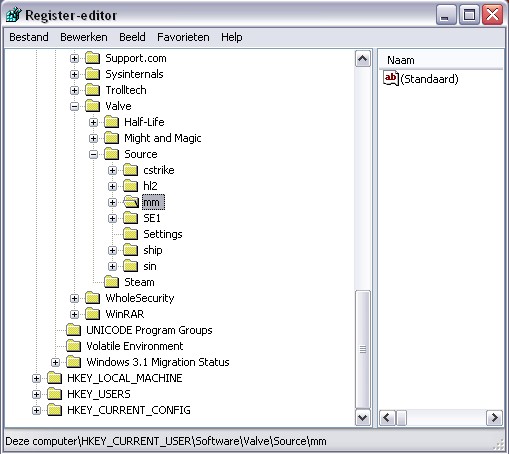
You did remove the right key, just for double-check that is this one (and not any other):
[HKEY_CURRENT_USER\Software\Valve\Source\mm] ?
Gaming PC: Asus TUF Gaming 570-Pro (wi-fi) * AMD Ryzen 7 5800X * Noctua NH-D15 * Corsair Vengeance LPX 64GB * Asus TUF RX 9070XT * Creative AE-9PE * 2 x Samsung 990 Pro * 7 x WD Gold HDD * Corsair RM 1000X * 1 x Asus DRW-24D5MT * Dell U3010 * Windows 11 *
Office PC: Asus TUF Gaming 570-Pro (wi-fi) * AMD Ryzen 7 5800X * Noctua NH-D15 * Corsair Vengeance LPX 64GB * Asus TUF Radeon 6800XT * Creative Soundblaster ZxR * 2 x Samsung 980 Pro * 7 x WD Gold HDD * Corsair HX 1000i * 1 x Asus DRW-24D5MT * Dell U4323QE * Club 3D DisplayPort2.1 BI-D 4K240Hz 1.6m * Windows 11 *
Office PC: Asus TUF Gaming 570-Pro (wi-fi) * AMD Ryzen 7 5800X * Noctua NH-D15 * Corsair Vengeance LPX 64GB * Asus TUF Radeon 6800XT * Creative Soundblaster ZxR * 2 x Samsung 980 Pro * 7 x WD Gold HDD * Corsair HX 1000i * 1 x Asus DRW-24D5MT * Dell U4323QE * Club 3D DisplayPort2.1 BI-D 4K240Hz 1.6m * Windows 11 *
Re: [Bink] Error Opening file: Not a Bink file
Yes, that's the one i deleted.
-
Blín D'ñero
- Site Admin
- Posts: 11037
- Joined: 17 Feb 2008, 02:05
- Location: Netherlands
- Contact:
Re: [Bink] Error Opening file: Not a Bink file
It is odd you are having that error even though you only have the Steam version, and no mixed situation there, even not in the past.
What could cause the issue;
-your Steam is a new installation? Not a copy from an archive folder? Which version? (Steam menu > Help > About Steam)
-rightclick on the game > Properties > tab "Updates": 'Always keep this game up to date' is selected?
What could cause the issue;
-your Steam is a new installation? Not a copy from an archive folder? Which version? (Steam menu > Help > About Steam)
-rightclick on the game > Properties > tab "Updates": 'Always keep this game up to date' is selected?
How did you play them?FireFork wrote:I'll try again. And no I have not played the entire game, but I checked some other cutscenes and they played without a single problem.
Gaming PC: Asus TUF Gaming 570-Pro (wi-fi) * AMD Ryzen 7 5800X * Noctua NH-D15 * Corsair Vengeance LPX 64GB * Asus TUF RX 9070XT * Creative AE-9PE * 2 x Samsung 990 Pro * 7 x WD Gold HDD * Corsair RM 1000X * 1 x Asus DRW-24D5MT * Dell U3010 * Windows 11 *
Office PC: Asus TUF Gaming 570-Pro (wi-fi) * AMD Ryzen 7 5800X * Noctua NH-D15 * Corsair Vengeance LPX 64GB * Asus TUF Radeon 6800XT * Creative Soundblaster ZxR * 2 x Samsung 980 Pro * 7 x WD Gold HDD * Corsair HX 1000i * 1 x Asus DRW-24D5MT * Dell U4323QE * Club 3D DisplayPort2.1 BI-D 4K240Hz 1.6m * Windows 11 *
Office PC: Asus TUF Gaming 570-Pro (wi-fi) * AMD Ryzen 7 5800X * Noctua NH-D15 * Corsair Vengeance LPX 64GB * Asus TUF Radeon 6800XT * Creative Soundblaster ZxR * 2 x Samsung 980 Pro * 7 x WD Gold HDD * Corsair HX 1000i * 1 x Asus DRW-24D5MT * Dell U4323QE * Club 3D DisplayPort2.1 BI-D 4K240Hz 1.6m * Windows 11 *
Re: [Bink] Error Opening file: Not a Bink file
The about steam window says:
Built: Jan 2 2012, at 16:42:05
Steam API: v012
Steam package versions: 1771/1771
And updates are enabled. When I checked the other cutscenes I just replayed the tutorial and watched the cutscene after, to make sure not all caused a crash, and it seems only the one at the Skull of shadows does that.
I forgot to mention this earlier which was really dumb of me, but I did have the multiplayer version before I bought the game. A friend gave me a steam key he got for free, and it was only the MP. So basically I only bought the SP, but both are steam versions.
Built: Jan 2 2012, at 16:42:05
Steam API: v012
Steam package versions: 1771/1771
And updates are enabled. When I checked the other cutscenes I just replayed the tutorial and watched the cutscene after, to make sure not all caused a crash, and it seems only the one at the Skull of shadows does that.
I forgot to mention this earlier which was really dumb of me, but I did have the multiplayer version before I bought the game. A friend gave me a steam key he got for free, and it was only the MP. So basically I only bought the SP, but both are steam versions.
-
Blín D'ñero
- Site Admin
- Posts: 11037
- Joined: 17 Feb 2008, 02:05
- Location: Netherlands
- Contact:
Re: [Bink] Error Opening file: Not a Bink file
Aha. Your situation is D. The whole issue never happens on a PC that has never seen the game before (so on first install).
Steam has evolved since 2008 so i suppose some internal changes could be complicating things.
First make sure Steam is not running. Then
Does that work?
Steam has evolved since 2008 so i suppose some internal changes could be complicating things.
First make sure Steam is not running. Then
- COPY the binkw32.dll file from
your STEAM directory\steamapps\*your account*\dark messiah might and magic single player\bin - paste it in
your STEAM directory\steamapps\*your account*\dark messiah might and magic single player
Does that work?
Gaming PC: Asus TUF Gaming 570-Pro (wi-fi) * AMD Ryzen 7 5800X * Noctua NH-D15 * Corsair Vengeance LPX 64GB * Asus TUF RX 9070XT * Creative AE-9PE * 2 x Samsung 990 Pro * 7 x WD Gold HDD * Corsair RM 1000X * 1 x Asus DRW-24D5MT * Dell U3010 * Windows 11 *
Office PC: Asus TUF Gaming 570-Pro (wi-fi) * AMD Ryzen 7 5800X * Noctua NH-D15 * Corsair Vengeance LPX 64GB * Asus TUF Radeon 6800XT * Creative Soundblaster ZxR * 2 x Samsung 980 Pro * 7 x WD Gold HDD * Corsair HX 1000i * 1 x Asus DRW-24D5MT * Dell U4323QE * Club 3D DisplayPort2.1 BI-D 4K240Hz 1.6m * Windows 11 *
Office PC: Asus TUF Gaming 570-Pro (wi-fi) * AMD Ryzen 7 5800X * Noctua NH-D15 * Corsair Vengeance LPX 64GB * Asus TUF Radeon 6800XT * Creative Soundblaster ZxR * 2 x Samsung 980 Pro * 7 x WD Gold HDD * Corsair HX 1000i * 1 x Asus DRW-24D5MT * Dell U4323QE * Club 3D DisplayPort2.1 BI-D 4K240Hz 1.6m * Windows 11 *
Re: [Bink] Error Opening file: Not a Bink file
No, there's no change at all.
-
Blín D'ñero
- Site Admin
- Posts: 11037
- Joined: 17 Feb 2008, 02:05
- Location: Netherlands
- Contact:
Re: [Bink] Error Opening file: Not a Bink file
You had previously gotten for free a multiplayer... but you don't realise that if you own a key you have both single and multiplayer, with that key you could have downloaded both on Steam. You didn't need to buy a new one. But anyway. Try this:
- Uninstall both singleplayer and multiplayer from Steam library. (Later you will download them anew)
- Then navigate to your Steam directory and in Steamapps > YOU, delete the folders
dark messiah might and magic single player
dark messiah might and magic multiplayer
(because Steam does not really remove them) - In Steam directory, delete your ClientRegistry.blob
- You have set Steam (in Preferences) to not start up with Windows.
- Reboot the PC
- In Registry delete:
[HKEY_CURRENT_USER\Software\Valve\Source\mm]
[HKEY_CURRENT_USER\Software\Valve\Steam\Apps\2100]
[HKEY_CURRENT_USER\Software\Valve\Steam\Apps\2130] - Reboot the PC.
- Launch Steam.
- Start downloading Dark Messiah singleplayer again.
- Try the game.
Gaming PC: Asus TUF Gaming 570-Pro (wi-fi) * AMD Ryzen 7 5800X * Noctua NH-D15 * Corsair Vengeance LPX 64GB * Asus TUF RX 9070XT * Creative AE-9PE * 2 x Samsung 990 Pro * 7 x WD Gold HDD * Corsair RM 1000X * 1 x Asus DRW-24D5MT * Dell U3010 * Windows 11 *
Office PC: Asus TUF Gaming 570-Pro (wi-fi) * AMD Ryzen 7 5800X * Noctua NH-D15 * Corsair Vengeance LPX 64GB * Asus TUF Radeon 6800XT * Creative Soundblaster ZxR * 2 x Samsung 980 Pro * 7 x WD Gold HDD * Corsair HX 1000i * 1 x Asus DRW-24D5MT * Dell U4323QE * Club 3D DisplayPort2.1 BI-D 4K240Hz 1.6m * Windows 11 *
Office PC: Asus TUF Gaming 570-Pro (wi-fi) * AMD Ryzen 7 5800X * Noctua NH-D15 * Corsair Vengeance LPX 64GB * Asus TUF Radeon 6800XT * Creative Soundblaster ZxR * 2 x Samsung 980 Pro * 7 x WD Gold HDD * Corsair HX 1000i * 1 x Asus DRW-24D5MT * Dell U4323QE * Club 3D DisplayPort2.1 BI-D 4K240Hz 1.6m * Windows 11 *
Re: [Bink] Error Opening file: Not a Bink file
It worked, I love you! I was almost at the point that I would just use the console to the next level, but lucky I didn't. Thanks so much, you have done so much for the community. 
(on a side note, the key was mp only, I did not have access to sp. You can't buy a game twice.)
(on a side note, the key was mp only, I did not have access to sp. You can't buy a game twice.)
-
Blín D'ñero
- Site Admin
- Posts: 11037
- Joined: 17 Feb 2008, 02:05
- Location: Netherlands
- Contact:
Re: [Bink] Error Opening file: Not a Bink file
Great... i'm happy for that!  I'll update the troubleshooting thread with this then.
I've never heard of a multiplayer only key for this game, really. Odd.
I'll update the troubleshooting thread with this then. I've never heard of a multiplayer only key for this game, really. Odd.
Gaming PC: Asus TUF Gaming 570-Pro (wi-fi) * AMD Ryzen 7 5800X * Noctua NH-D15 * Corsair Vengeance LPX 64GB * Asus TUF RX 9070XT * Creative AE-9PE * 2 x Samsung 990 Pro * 7 x WD Gold HDD * Corsair RM 1000X * 1 x Asus DRW-24D5MT * Dell U3010 * Windows 11 *
Office PC: Asus TUF Gaming 570-Pro (wi-fi) * AMD Ryzen 7 5800X * Noctua NH-D15 * Corsair Vengeance LPX 64GB * Asus TUF Radeon 6800XT * Creative Soundblaster ZxR * 2 x Samsung 980 Pro * 7 x WD Gold HDD * Corsair HX 1000i * 1 x Asus DRW-24D5MT * Dell U4323QE * Club 3D DisplayPort2.1 BI-D 4K240Hz 1.6m * Windows 11 *
Office PC: Asus TUF Gaming 570-Pro (wi-fi) * AMD Ryzen 7 5800X * Noctua NH-D15 * Corsair Vengeance LPX 64GB * Asus TUF Radeon 6800XT * Creative Soundblaster ZxR * 2 x Samsung 980 Pro * 7 x WD Gold HDD * Corsair HX 1000i * 1 x Asus DRW-24D5MT * Dell U4323QE * Club 3D DisplayPort2.1 BI-D 4K240Hz 1.6m * Windows 11 *
Re: [Bink] Error Opening file: Not a Bink file
I got curious about the mp only key, and looked it up. Apparently they can be received for free through a polish website.
You can read up on it if you want, found a few forum threads with information.
http://thebotnet.com/freebies/36134-fre ... might-and/
http://www.facepunch.com/threads/1018615
Apparently it was promotion in Portugal, seems odd since all other sources say it's a polish website. Maybe he meant Poland?
Steam forums: "wow the free dark messiah promotion is still running? that was years ago. should be technically legal, it was originally coming from a game magazine in portugal, nothing stolen or anything"
Also Steamgifts.com lists it as a exploited key:
Keys Considered Exploited:
Serious Sam: Double D
Dead Island
Bulletstorm
Homefront Shotgun DLC
AI War
Portal 2
DiRT 3
Dark Messiah of Might & Magic Multiplayer
Eets (in certain amounts)
Don't really know what to make of this, but I hope this will help if someone else gets the same problem. Also, I backed up my saves and I had no problems, so I didn't suffer by the reinstall. Yet again, Thanks for what you have done for the community
You can read up on it if you want, found a few forum threads with information.
http://thebotnet.com/freebies/36134-fre ... might-and/
http://www.facepunch.com/threads/1018615
Apparently it was promotion in Portugal, seems odd since all other sources say it's a polish website. Maybe he meant Poland?
Steam forums: "wow the free dark messiah promotion is still running? that was years ago. should be technically legal, it was originally coming from a game magazine in portugal, nothing stolen or anything"
Also Steamgifts.com lists it as a exploited key:
Keys Considered Exploited:
Serious Sam: Double D
Dead Island
Bulletstorm
Homefront Shotgun DLC
AI War
Portal 2
DiRT 3
Dark Messiah of Might & Magic Multiplayer
Eets (in certain amounts)
Don't really know what to make of this, but I hope this will help if someone else gets the same problem. Also, I backed up my saves and I had no problems, so I didn't suffer by the reinstall. Yet again, Thanks for what you have done for the community
-
Blín D'ñero
- Site Admin
- Posts: 11037
- Joined: 17 Feb 2008, 02:05
- Location: Netherlands
- Contact:
Re: [Bink] Error Opening file: Not a Bink file
Thank YOU, and Greetings to the Community! 
Thank you very much FireFork for the valuable information about that key that was completely new to me.

Thank you very much FireFork for the valuable information
about that key that was completely new to me. Gaming PC: Asus TUF Gaming 570-Pro (wi-fi) * AMD Ryzen 7 5800X * Noctua NH-D15 * Corsair Vengeance LPX 64GB * Asus TUF RX 9070XT * Creative AE-9PE * 2 x Samsung 990 Pro * 7 x WD Gold HDD * Corsair RM 1000X * 1 x Asus DRW-24D5MT * Dell U3010 * Windows 11 *
Office PC: Asus TUF Gaming 570-Pro (wi-fi) * AMD Ryzen 7 5800X * Noctua NH-D15 * Corsair Vengeance LPX 64GB * Asus TUF Radeon 6800XT * Creative Soundblaster ZxR * 2 x Samsung 980 Pro * 7 x WD Gold HDD * Corsair HX 1000i * 1 x Asus DRW-24D5MT * Dell U4323QE * Club 3D DisplayPort2.1 BI-D 4K240Hz 1.6m * Windows 11 *
Office PC: Asus TUF Gaming 570-Pro (wi-fi) * AMD Ryzen 7 5800X * Noctua NH-D15 * Corsair Vengeance LPX 64GB * Asus TUF Radeon 6800XT * Creative Soundblaster ZxR * 2 x Samsung 980 Pro * 7 x WD Gold HDD * Corsair HX 1000i * 1 x Asus DRW-24D5MT * Dell U4323QE * Club 3D DisplayPort2.1 BI-D 4K240Hz 1.6m * Windows 11 *
Re: [Bink] Error Opening file: Not a Bink file
I've published this post in order to be useful, not demanding help.
I've had the same problem as "FireFork" , I've bought the game on Steam and I never had installed the DVD version, whenever the game tried to play the video between the first and second chapter the game stops and an error message was shown :
"[Bink]Error Opening File. Not a bink File. Skipping video."
To solve it I've downloaded the bink viedeo player for bik files, and i tried to play the video files from the game folder.They were all ok except for the scene involving the error, I've deleted that file and I made steam test the game files, Steam re-downloaded the file and the error was solved.
I've had the same problem as "FireFork" , I've bought the game on Steam and I never had installed the DVD version, whenever the game tried to play the video between the first and second chapter the game stops and an error message was shown :
"[Bink]Error Opening File. Not a bink File. Skipping video."
To solve it I've downloaded the bink viedeo player for bik files, and i tried to play the video files from the game folder.They were all ok except for the scene involving the error, I've deleted that file and I made steam test the game files, Steam re-downloaded the file and the error was solved.