PC Air Cooling Tips

Knowledgebase collection for PC, as well as useful tools.
dontos
Posts: 53
Joined: 07 Jan 2009, 08:00

PC Air Cooling Tips

Post by dontos »

Nearly all PC gamers are aware that good PC cooling is critical for hardware longevity and stable performance. However, there are a few things I have learned through my own experience and articles I have read on this subject, that many gamers are not aware of. This post deals specifically to air cooling. If you find any incorrect info, please point this out.

For proper air cooling of the internal components of a PC, it is critical that there is air flow through the case. There needs to be outside air being drawn into the case through the front and in some cases through a side processor and/or video card vent as well, while air from inside the case is exhausted out the back. This helps maintain a large temperature differential between the internal components of the PC and the air flowing through and around these components, which maximizes heat transfer. Although many internal components have heatsinks equipped with fans, the ability of these devices to dissipate the heat of the components to which they are attached, is ultimately dependent on a fairly larger temperature differential between these heatsinks and the air being drawn through them. If there is insufficient airflow through the case, the temperature of the air inside the case will become too high for sufficient heat transfer to occur and these components will overheat, even if they are equipped with active high capacity heatsinks.

This might lead one to believe that leaving the side panel off a tower case might be a good idea, but there are two reasons I'm aware of for not doing this. First, many of the components in the PC are not equipped with active heatsinks, including hard drives, memory modules, optical drives and the motherboard itself. Without are circulation, heat transfer between these components and the surrounding air will be poor. Second, the fans inside the case and their heatsinks will collect dust more quickly if the case is left open and dust not only clogs fans and heatsinks, but acts as an insulation on the components it covers as well.

So, is it best to have a front case fan, rear fan, or both? The answer in most cases is either both a front intake and rear exhaust fan or a front intake fan only. The disadvantage of having only a rear exhaust fan is that this configuration leads to a slight negative pressure in the case, which leads to air being drawn through tiny openings in the case, which include front case connectors, the space around the power and reset buttons and those present in and around optical drives. To avoid this, one must maintain a neutral or slightly positive pressure in the case. To achieve this condition, you need to have more air being drawn into the case than air being exhausted out through rear case fans and other exhaust fans, such as the power supply fan(s) and video card fan. Installing the highest capacity front fan possible with no rear case fan or a much lower capacity fan at the back of the case will help avoid negative case pressure while ensuring proper airflow. Some cases are equipped with front air intake grills which drastically reduce air flow. If your case has such a grill, you might consider modifying or removing it entirely to ensure that enough cool air is drawn into the case.

In order to reduce noise and energy consumption, some fans are equipped with a temperature sensor which adjusts the fan RPM according to the temperature of the air moving through it. This is a good idea, but only for exhaust fans, NOT front intake fans, as front fans draw the air from outside the case and will not be able to adjust to a higher RPM when the system is running hot. Alternatively, many motherboards support variable fan speed control, which allows you to control fan input voltages and thus speed, according to CPU, motherboard chipset or other temperature. These can be useful, but be careful, as some fans cannot handle too low of a voltage. I do not recommend using this for the CPU heatsink fan. Also, don't use this for fans equipped with temperature sensors (self adjusting).
Image
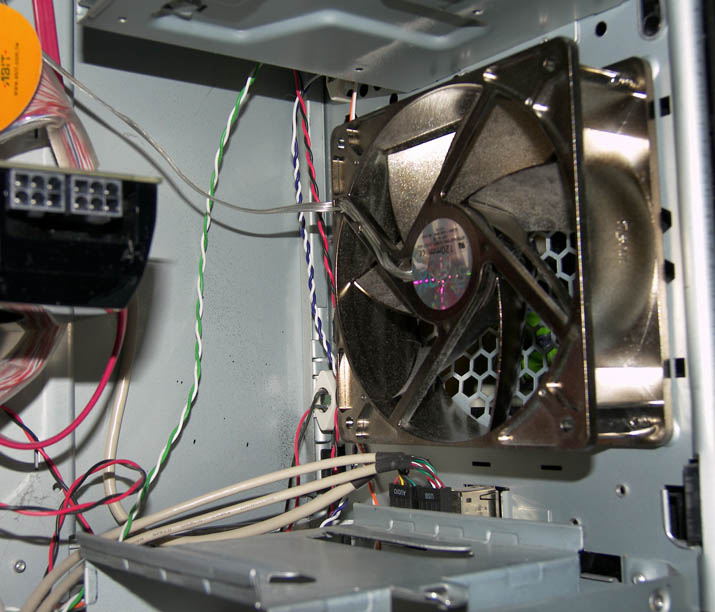
This is the front case fan on my system. It is a 120mm, deep housing, high capacity (92 CFM = 2.6 CMM max air flow) fan.

In addition to the power supply, video card and small chipset heatpipe exhaust fans, I have a 120mm low capacity (22 CFM = 0.62 CMM) rear exhaust case fan.

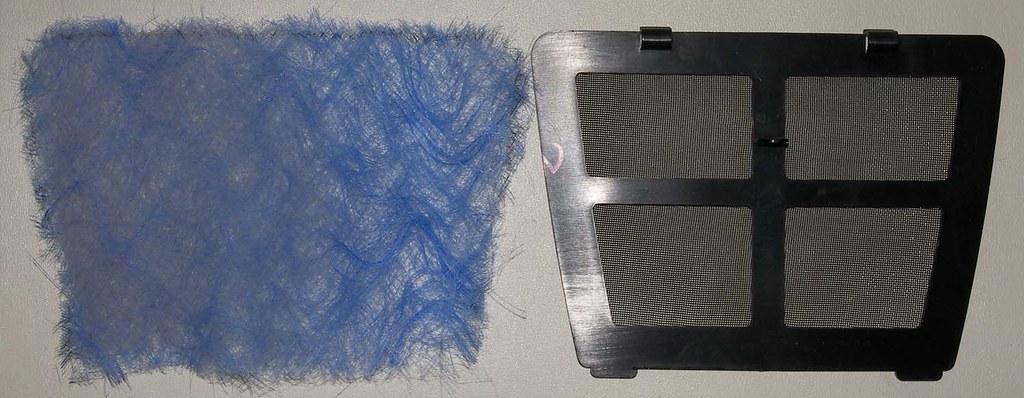
Some cases come with an air filter for the front fan, which is quite effective at trapping dust and slowing dust build up inside the case. However, these filters tend to restrict airflow quite a bit and become clogged with dust very quickly. As an alternative, you can use this filter as a template and cut out pieces of fiberglass from an inexpensive furnace filter and use these instead of the reusable filter that came with the case. This material will not restrict the airflow as much as the built in filter, but will become clogged with dust almost as quickly. I can only go a week between changings.
Image
Here is a piece a fiberglass air filter material cut to size next to the front intake filter that came with my case. Notice the dust on the fiberglass after only a few days of use.
Image
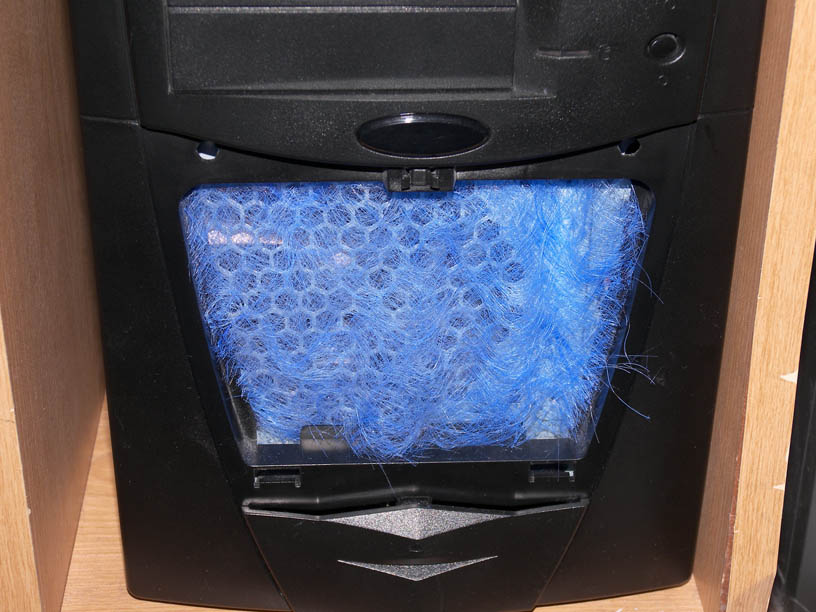
Here is how the front of my system looks with the fiberglass filter. Notice that the front grill is removed, as it restricts airflow.

User avatar
Blín D'ñero
Site Admin
Posts: 10570
Joined: 17 Feb 2008, 02:05
Location: Netherlands
Contact:

Re: PC Air Cooling Tips

Post by Blín D'ñero »

Interesting!
Installing the highest capacity front fan possible with no rear case fan or a much lower capacity fan at the back of the case will help avoid negative case pressure while ensuring proper airflow.
Aha, that explains why my [good] cases have that. I didn't know it works that way.
[good cases]:
My first PC (prebuilt Pentium 3) has no front fan at all. My next PC's i built myself. All have more or less the ideal situation as seen in the article: my 2 old Lian-Li cases and my current Coolermaster Stacker cases. The Lian-Li's have quite thin front fans. The Coolermaster Stackers (bigtower) have deep front fans.

I''ll put the sidepanels back. :oops: The CPU coolers get clogged quickly and then not only start making more noise, but also the PC's behaviour becomes unpredicatable. One day one PC didn't detect the harddiskdrives during POST anymore. I checked the cables, none was loose. I vacumed the thick cloth from the CPU-cooler and voilá the BIOS hardware check was quick again.
Time to clean the insides again and put the sidepanel back.

Thanks for the article Dontos! :thumbup:
Gaming PC: Asus TUF Gaming 570-Pro (wi-fi) * AMD Ryzen 7 5800X * Noctua NH-D15 * Corsair Vengeance LPX 64GB * Asus TUF RX 9070XT * Creative AE-9PE * 2 x Samsung 990 Pro * 7 x WD Gold HDD * Corsair RM 1000X * 1 x Asus DRW-24D5MT * Dell U3010 * Windows 11 *

Office PC: Asus TUF Gaming 570-Pro (wi-fi) * AMD Ryzen 7 5800X * Noctua NH-D15 * Corsair Vengeance LPX 64GB * Asus TUF Radeon 6800XT * Creative Soundblaster ZxR * 2 x Samsung 980 Pro * 7 x WD Gold HDD * Corsair HX 1000i * 1 x Asus DRW-24D5MT * Dell U4323QE * Club 3D DisplayPort2.1 BI-D 4K240Hz 1.6m * Windows 11 *
dontos
Posts: 53
Joined: 07 Jan 2009, 08:00

Re: PC Air Cooling Tips

Post by dontos »

You are most welcome. Glad you found this info useful.

One of the major brands of high quality PCs in the American market is Dell. We use mostly Dell systems at my workplace. I have always been impressed by the design of Dell systems, especially the case and airflow designs. All of the Dell systems I have seen have large front fans and front grills which allow for unrestricted airflow into the case. Just more evidence that this is the way to go. I have a Rosewill http://www.rosewill.com/ case and am generally happy with it except for the fact that the front grill air filter cover restricts airflow too much. I tried to modify it by increasing the size of the openings, but finally decided it was best to leave it off. My front fan is a SilenX http://www.silenx.com/index.asp. It was pretty expensive for a fan, but seems to work very well without being too noisy. My rear case fan is a Cooler Master and I'm happy with it as well.
dontos
Posts: 53
Joined: 07 Jan 2009, 08:00

Re: PC Air Cooling Tips

Post by dontos »

Heat transfer in a PC takes place primarily by conduction (heat flow through a solid or fluid) and convection (heat transfer between a moving fluid and a solid). It should be noted that air is a fluid. For example, heat is conducted from the processor to the body of the heatsink. Heat is then transferred from the heatsink to the surrounding air through convection. Convection can be a very efficient way of transferring heat into or out of an object. This is why convection ovens cook food faster than conventional ovens that lack the fans to move the hot air around. Links to some interesting articles below.

http://www.engineeringtoolbox.com/condu ... d_428.html

http://www.engineeringtoolbox.com/conve ... d_430.html

This article deals deals specifically with convection as it relates to heat transfer in a PC: http://www.pcper.com/article.php?aid=-1 ... pert&pid=7 You don't need to get into the mathematical equations to get a basic understanding of the general concepts involved.

Here is another good article on Wikipedia: http://en.wikipedia.org/wiki/Thermal_ma ... nd_systems

Radiative heat transfer doesn't normally play a significant roll in PC cooling. If it ever does, something has gone terribly wrong! For example, if something is glowing red or white hot and you can feel the heat coming off of it without actually touching it, it is radiating heat!
dontos
Posts: 53
Joined: 07 Jan 2009, 08:00

Re: PC Air Cooling Tips

Post by dontos »

I found this interesting article on peltier coolers. http://www.heatsink-guide.com/peltier.htm Very interesting but not very practical in most situations. Also not very green. These things use a lot of power and require a higher capacity heatsink to go with them, if I understand the article correctly.
User avatar
Blín D'ñero
Site Admin
Posts: 10570
Joined: 17 Feb 2008, 02:05
Location: Netherlands
Contact:

Re: PC Air Cooling Tips

Post by Blín D'ñero »

Yeah, not very energy-effient alltogether.

Biggest improvements are in decreasing size and using better materials in the processors so that they run less hot and heat is less of a damaging factor. So: less need for drastic cooling.
Processors getting smaller and smaller, someday beyond molecular level, protons, data not moving through any material at all, but through thin air, micro-laserbeams etc. :cool:
Gaming PC: Asus TUF Gaming 570-Pro (wi-fi) * AMD Ryzen 7 5800X * Noctua NH-D15 * Corsair Vengeance LPX 64GB * Asus TUF RX 9070XT * Creative AE-9PE * 2 x Samsung 990 Pro * 7 x WD Gold HDD * Corsair RM 1000X * 1 x Asus DRW-24D5MT * Dell U3010 * Windows 11 *

Office PC: Asus TUF Gaming 570-Pro (wi-fi) * AMD Ryzen 7 5800X * Noctua NH-D15 * Corsair Vengeance LPX 64GB * Asus TUF Radeon 6800XT * Creative Soundblaster ZxR * 2 x Samsung 980 Pro * 7 x WD Gold HDD * Corsair HX 1000i * 1 x Asus DRW-24D5MT * Dell U4323QE * Club 3D DisplayPort2.1 BI-D 4K240Hz 1.6m * Windows 11 *
User avatar
Blín D'ñero
Site Admin
Posts: 10570
Joined: 17 Feb 2008, 02:05
Location: Netherlands
Contact:

Re: PC Air Cooling Tips

Post by Blín D'ñero »

What to think of CoolerMaster's newest model HAF 932 then? It has huge fans at 4 sides! See gallery
the HAF 932 presents its sturdy sentinel housing and revolutionary High Air Flow structure
  • Front : 230x30mm red LED fan x 1, 700 R.P.M, 19 dBA
    Side: 230x30mm standard fan x 1, 700rpm, 19dBA
    (support 120mm fan x 4)
  • Top: 230x30mm standard fan x 1, 700 R.P.M, 19dBA
    (support 120mm fan x 3 or 120mm x 1 + 230x30mm x 1)
  • Rear: 140x25mm standard fan x 1, 1200 R.P.M, 17dBA
    (support 140mm fan)
230 mm sidefan:
Image

In the top you can choose one 230 mm fan or two 120 mm fans.
Gaming PC: Asus TUF Gaming 570-Pro (wi-fi) * AMD Ryzen 7 5800X * Noctua NH-D15 * Corsair Vengeance LPX 64GB * Asus TUF RX 9070XT * Creative AE-9PE * 2 x Samsung 990 Pro * 7 x WD Gold HDD * Corsair RM 1000X * 1 x Asus DRW-24D5MT * Dell U3010 * Windows 11 *

Office PC: Asus TUF Gaming 570-Pro (wi-fi) * AMD Ryzen 7 5800X * Noctua NH-D15 * Corsair Vengeance LPX 64GB * Asus TUF Radeon 6800XT * Creative Soundblaster ZxR * 2 x Samsung 980 Pro * 7 x WD Gold HDD * Corsair HX 1000i * 1 x Asus DRW-24D5MT * Dell U4323QE * Club 3D DisplayPort2.1 BI-D 4K240Hz 1.6m * Windows 11 *
dontos
Posts: 53
Joined: 07 Jan 2009, 08:00

Re: PC Air Cooling Tips

Post by dontos »

Well, assuming that the front, top and side fans are blowing air into the case, it looks like this case design is consistent with the principles we've been discussing here. If the airflow is high enough, there shouldn't be too much dust buildup either. However, almost all systems can benefit from being blown out at least once a year, if not more often.
User avatar
Blín D'ñero
Site Admin
Posts: 10570
Joined: 17 Feb 2008, 02:05
Location: Netherlands
Contact:

Re: PC Air Cooling Tips

Post by Blín D'ñero »

dontos wrote:Well, assuming that the front, top and side fans are blowing air into the case
Now i get the idea. The biggest 3 sucking in, the small backside fans blowing out.

My Coolermaster Stackers STC-T01's have mounting bracket for optional sidefan of 80 mm (much smaller than the one on the picture above), so it would be noisy! :eh:

Image

Even though the side maze is 300mm diameter, the bracket for a fan is only 80 mm, in the center of it.
Or i should try to creatively reconstruct it so that a 230mm fan fits on it. :)
Gaming PC: Asus TUF Gaming 570-Pro (wi-fi) * AMD Ryzen 7 5800X * Noctua NH-D15 * Corsair Vengeance LPX 64GB * Asus TUF RX 9070XT * Creative AE-9PE * 2 x Samsung 990 Pro * 7 x WD Gold HDD * Corsair RM 1000X * 1 x Asus DRW-24D5MT * Dell U3010 * Windows 11 *

Office PC: Asus TUF Gaming 570-Pro (wi-fi) * AMD Ryzen 7 5800X * Noctua NH-D15 * Corsair Vengeance LPX 64GB * Asus TUF Radeon 6800XT * Creative Soundblaster ZxR * 2 x Samsung 980 Pro * 7 x WD Gold HDD * Corsair HX 1000i * 1 x Asus DRW-24D5MT * Dell U4323QE * Club 3D DisplayPort2.1 BI-D 4K240Hz 1.6m * Windows 11 *
dontos
Posts: 53
Joined: 07 Jan 2009, 08:00

Re: PC Air Cooling Tips

Post by dontos »

230mm fan! That is one big fan! I thought 120mm was pretty much the largest for PCs. Well, the larger the fan, the more air you can move without making too much noise. I say you should go for it! :thumbup:
User avatar
Blín D'ñero
Site Admin
Posts: 10570
Joined: 17 Feb 2008, 02:05
Location: Netherlands
Contact:

Re: PC Air Cooling Tips

Post by Blín D'ñero »

dontos wrote:230mm fan! That is one big fan! I thought 120mm was pretty much the largest for PCs. Well, the larger the fan, the more air you can move without making too much noise. I say you should go for it! :thumbup:
Here they are: http://www.coolermaster-usa.com/categor ... ry_id=1656 -- > http://www.coolermaster-usa.com/product ... ct_id=2892 ... But no picture, specifications or availability... so it seems.

Ahh, but here: $11.99 :D
Gaming PC: Asus TUF Gaming 570-Pro (wi-fi) * AMD Ryzen 7 5800X * Noctua NH-D15 * Corsair Vengeance LPX 64GB * Asus TUF RX 9070XT * Creative AE-9PE * 2 x Samsung 990 Pro * 7 x WD Gold HDD * Corsair RM 1000X * 1 x Asus DRW-24D5MT * Dell U3010 * Windows 11 *

Office PC: Asus TUF Gaming 570-Pro (wi-fi) * AMD Ryzen 7 5800X * Noctua NH-D15 * Corsair Vengeance LPX 64GB * Asus TUF Radeon 6800XT * Creative Soundblaster ZxR * 2 x Samsung 980 Pro * 7 x WD Gold HDD * Corsair HX 1000i * 1 x Asus DRW-24D5MT * Dell U4323QE * Club 3D DisplayPort2.1 BI-D 4K240Hz 1.6m * Windows 11 *
dontos
Posts: 53
Joined: 07 Jan 2009, 08:00

Re: PC Air Cooling Tips

Post by dontos »

I think the thing it avoid too much of a pressure gradient between the inside on the case and the surround atmosphere in either direction. I don't think you would necessarily want too strong of positive pressure, as that might lead to a lot of air flow through the optical drives from inside the case and that might lead to a lot of dust buildup in them which is a major cause of failure with these drives. Of course you can filter the air coming in, which would help a lot by reducing dust and also reducing the volume of air somewhat, which would be OK if you had three big intake fans like that. In any case, I think a very slight positive pressure (close to neutral) is where you want to be. So if you have a lot of air coming in, you want that air to have an easy way out.
dontos
Posts: 53
Joined: 07 Jan 2009, 08:00

Re: PC Air Cooling Tips

Post by dontos »

I noticed that one of these fans moves 110 cfm at only 700 rpm! So, there is definitely a benefit to going larger on the fans.
User avatar
Blín D'ñero
Site Admin
Posts: 10570
Joined: 17 Feb 2008, 02:05
Location: Netherlands
Contact:

Re: PC Air Cooling Tips

Post by Blín D'ñero »

Yes, but it's not widely available (it is in USA but not here). This one by Akasa is, even my etailer sells it.
Frame Dimensions 220 x 30mm (170mm Fittings)
Fan Speed 600 RPM

Fan Airflow 95.63 CFM
Gaming PC: Asus TUF Gaming 570-Pro (wi-fi) * AMD Ryzen 7 5800X * Noctua NH-D15 * Corsair Vengeance LPX 64GB * Asus TUF RX 9070XT * Creative AE-9PE * 2 x Samsung 990 Pro * 7 x WD Gold HDD * Corsair RM 1000X * 1 x Asus DRW-24D5MT * Dell U3010 * Windows 11 *

Office PC: Asus TUF Gaming 570-Pro (wi-fi) * AMD Ryzen 7 5800X * Noctua NH-D15 * Corsair Vengeance LPX 64GB * Asus TUF Radeon 6800XT * Creative Soundblaster ZxR * 2 x Samsung 980 Pro * 7 x WD Gold HDD * Corsair HX 1000i * 1 x Asus DRW-24D5MT * Dell U4323QE * Club 3D DisplayPort2.1 BI-D 4K240Hz 1.6m * Windows 11 *
dontos
Posts: 53
Joined: 07 Jan 2009, 08:00

Re: PC Air Cooling Tips

Post by dontos »

So, you purchase from a UK etailer? How does that work? They are still using pounds and your country is on the euro, correct? I noticed that they rated the airflow in cubic feet per minute. I know that the foot is an English measurement, but I thought they switched to the metric system. Are PC cooling fans rated by CFM in Europe much, or do you usually use cubic meters per minute or per hour? Just curious.

My guess is that this larger fan size will become more and more common as CPUs, GPUs and chipsets continue to produce more and more heat which must be dissipated.
User avatar
Blín D'ñero
Site Admin
Posts: 10570
Joined: 17 Feb 2008, 02:05
Location: Netherlands
Contact:

Re: PC Air Cooling Tips

Post by Blín D'ñero »

No i don't! It is available here where i buy from. :) I guess i put a wrong link in the other post.


It's always cfm and i usually compare to the average number for normal 80 mm case fan, about '30 cfm', without actually realising what it means. :D
Gaming PC: Asus TUF Gaming 570-Pro (wi-fi) * AMD Ryzen 7 5800X * Noctua NH-D15 * Corsair Vengeance LPX 64GB * Asus TUF RX 9070XT * Creative AE-9PE * 2 x Samsung 990 Pro * 7 x WD Gold HDD * Corsair RM 1000X * 1 x Asus DRW-24D5MT * Dell U3010 * Windows 11 *

Office PC: Asus TUF Gaming 570-Pro (wi-fi) * AMD Ryzen 7 5800X * Noctua NH-D15 * Corsair Vengeance LPX 64GB * Asus TUF Radeon 6800XT * Creative Soundblaster ZxR * 2 x Samsung 980 Pro * 7 x WD Gold HDD * Corsair HX 1000i * 1 x Asus DRW-24D5MT * Dell U4323QE * Club 3D DisplayPort2.1 BI-D 4K240Hz 1.6m * Windows 11 *
dontos
Posts: 53
Joined: 07 Jan 2009, 08:00

Re: PC Air Cooling Tips

Post by dontos »

There is a little over 3 feet in a meter (1 foot = about 30cm), so think of a square box that is about 30cm on a side.
User avatar
Blín D'ñero
Site Admin
Posts: 10570
Joined: 17 Feb 2008, 02:05
Location: Netherlands
Contact:

Re: PC Air Cooling Tips

Post by Blín D'ñero »

Thanks! :thumbup:
Gaming PC: Asus TUF Gaming 570-Pro (wi-fi) * AMD Ryzen 7 5800X * Noctua NH-D15 * Corsair Vengeance LPX 64GB * Asus TUF RX 9070XT * Creative AE-9PE * 2 x Samsung 990 Pro * 7 x WD Gold HDD * Corsair RM 1000X * 1 x Asus DRW-24D5MT * Dell U3010 * Windows 11 *

Office PC: Asus TUF Gaming 570-Pro (wi-fi) * AMD Ryzen 7 5800X * Noctua NH-D15 * Corsair Vengeance LPX 64GB * Asus TUF Radeon 6800XT * Creative Soundblaster ZxR * 2 x Samsung 980 Pro * 7 x WD Gold HDD * Corsair HX 1000i * 1 x Asus DRW-24D5MT * Dell U4323QE * Club 3D DisplayPort2.1 BI-D 4K240Hz 1.6m * Windows 11 *
User avatar
Blín D'ñero
Site Admin
Posts: 10570
Joined: 17 Feb 2008, 02:05
Location: Netherlands
Contact:

Re: PC Air Cooling Tips

Post by Blín D'ñero »

I have the sidefans running in all 3 of my working PC's which are all built in Coolermaster Stackers (STC-T01's ) and have crossfire: 7970 CF, 5870 CF, 4870X2.
Gaming PC: Asus TUF Gaming 570-Pro (wi-fi) * AMD Ryzen 7 5800X * Noctua NH-D15 * Corsair Vengeance LPX 64GB * Asus TUF RX 9070XT * Creative AE-9PE * 2 x Samsung 990 Pro * 7 x WD Gold HDD * Corsair RM 1000X * 1 x Asus DRW-24D5MT * Dell U3010 * Windows 11 *

Office PC: Asus TUF Gaming 570-Pro (wi-fi) * AMD Ryzen 7 5800X * Noctua NH-D15 * Corsair Vengeance LPX 64GB * Asus TUF Radeon 6800XT * Creative Soundblaster ZxR * 2 x Samsung 980 Pro * 7 x WD Gold HDD * Corsair HX 1000i * 1 x Asus DRW-24D5MT * Dell U4323QE * Club 3D DisplayPort2.1 BI-D 4K240Hz 1.6m * Windows 11 *
User avatar
Blín D'ñero
Site Admin
Posts: 10570
Joined: 17 Feb 2008, 02:05
Location: Netherlands
Contact:

Re: PC Air Cooling Tips

Post by Blín D'ñero »

How PC Fans Work (pcbheaven)
Gaming PC: Asus TUF Gaming 570-Pro (wi-fi) * AMD Ryzen 7 5800X * Noctua NH-D15 * Corsair Vengeance LPX 64GB * Asus TUF RX 9070XT * Creative AE-9PE * 2 x Samsung 990 Pro * 7 x WD Gold HDD * Corsair RM 1000X * 1 x Asus DRW-24D5MT * Dell U3010 * Windows 11 *

Office PC: Asus TUF Gaming 570-Pro (wi-fi) * AMD Ryzen 7 5800X * Noctua NH-D15 * Corsair Vengeance LPX 64GB * Asus TUF Radeon 6800XT * Creative Soundblaster ZxR * 2 x Samsung 980 Pro * 7 x WD Gold HDD * Corsair HX 1000i * 1 x Asus DRW-24D5MT * Dell U4323QE * Club 3D DisplayPort2.1 BI-D 4K240Hz 1.6m * Windows 11 *
Post Reply