It is because the kicking animation while also holding a weapon is not worked out well for widescreen. Wrong coordinates between sword and hand, or: the sword doesn't follow the hand during the kick. There's no way to fix it.rogermorse (on the Steam forum) wrote:Weapon flickers when kicking
There is this thing that is the main problem of the game in my case. I have some crashed now and then but it's ok i can live with it, but this flickers when I kick enemies is really atmosphere breaking stuff.
Basically let's say I have a weapon equipped (any weapon) and i kick, the leg moves correctly on the screen but the equipped weapon will flicker like crazy. If I kick without weapon equipped, the kick is also still fine.
Is there a way to fix this? This happens with every weapon, with or without shield. I tried with and without vsync. With vsync it is less obvious but it is still there.
Enabling vsync makes it less apparent though.
Eyefinity (3-screens in landscape) illustrates most clearly what's wrong:
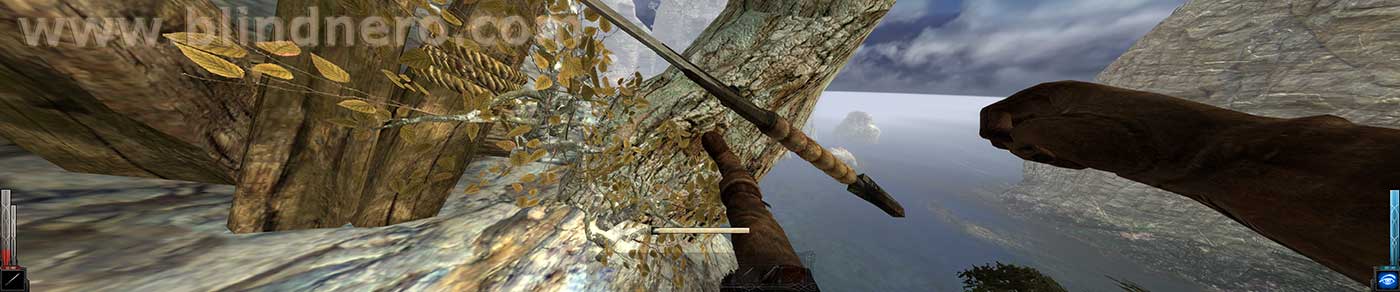
This screenshot shows that the game's "camera-lens" is very wide angle, so: horizontally stretched to the sides. It's the same on a single widescreen but Eyefinity makes it much more clear. On a 4:3 CRT the centre part of this FOV (field of view) used to look fine, with this issue if you will hardly noticeable.
- Onscreen actually appear TWO swords: one in focus, and one ghost of it in the hand (this ghost isn't captured in screenshots).
It seems that the game code wants the sword-object to stay in focus (centre/single screen), and at the same time the hand is told to hold the sword-object.
The focus-sword stays solid (when vsync is enabled) on the centre screen, while its ghost flickers (trying to materialize, but failing) in the hand and is transparent.
- It is least apparent on a single screen and with V-Sync enabled: sword looks solid, ghost sword is transparent.
- With vsync disabled, both sword and ghost sword are transparent -> stronger flickering effect.
- It is hardly noticeable on a 4:3 CRT monitor, on which the game was designed mostly. It's an error but it is small; the more widescreen you go, the bigger the error grows exponentially.